
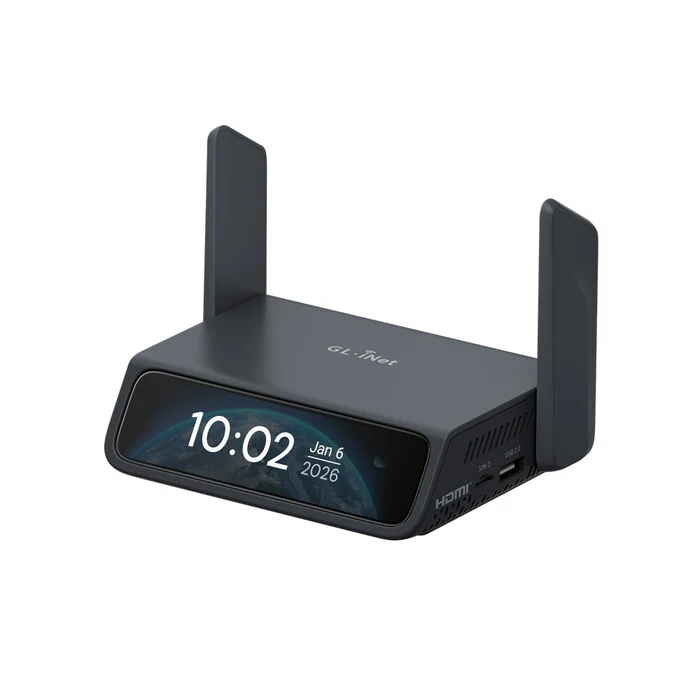
Comet 5G (GL-RM10RC) Wi-Fi 6 KVM over 5G RedCap
by AFI WIRELESS US
$299.99
In stock
Added to cart.
Comet compatibility: Works with Comet 5G for remote startup, reboot, and forced recovery when paired with the ATX board (accessory).
Installation: Connect the ATX board to the PC motherboard and your Comet KVM per AFI WIRELESS documentation for advanced remote power management.
- Enjoy FREE SHIPPING for all products, with an estimated delivery time of 5-8 working days.
- Products with the "Ship from China" tag are shipped from outside the US and are subject to TAX & VAT & longer delivery time.
- If you are a customer located outside of the US, please visit the Global Store for international shipping options.
Meet Comet 5G
World's first 5G RedCap Wi-Fi 6 remote KVM
- 5G RedCap connectivity: Independent out-of-band access when LAN or Wi-Fi is misconfigured
- Multi-network auto-failover: Ethernet → Wi-Fi → 5G/4G when the primary path fails
- Nearby Control: Self-contained wireless signal for local BIOS access without relying on site Wi-Fi
- 64GB eMMC storage: Built-in image repository for remote OS and firmware deployment
- Browser-based access: Windows, macOS, or Linux—no app required for core workflows
- 4K@30FPS video: Crisp visuals with H.264 encoding
World's first remote KVM with cellular connectivity
Featuring 5G RedCap for high-speed, lower-power cellular with global 4G LTE fallback, Comet 5G provides a dedicated out-of-band (OOB) management path that does not depend on the client's local Wi-Fi or Ethernet—ideal when primary connectivity is down or untrusted.
Deploy with out-of-band management
Network independence. Uses its own cellular data path so you can reach equipment even when site LAN/Wi-Fi is unavailable or misconfigured.
Multi-network failover. Automatically prioritizes Ethernet, then Wi-Fi, then cellular so the management channel stays reachable.
Remote access that fits real workflows
Nearby Control
Enable AP mode in Wi-Fi settings to broadcast a local SSID: connect with a laptop or tablet for BIOS and maintenance in air-gapped or offline rooms—no extra monitor or keyboard required. (Management-only link; does not route general internet to the client unless configured separately.)
Video Screen Wall (cloud)
Unify multiple KVM feeds into one dashboard via AFI WIRELESS cloud. AFI WIRELESS notes this premium capability is free today but may move to subscription pricing in the future.
Browser or app
Use a modern browser for clientless access—including BIOS screens—or install the GLKVM app on laptop, phone, or tablet when you prefer a dedicated UI.
Remote power
- Wake on LAN: Built into GLKVM for supported hosts.
- ATX board: Reliable power cycles via USB accessory.
- Fingerbot: Physical power-button press for stubborn systems.
Built for demanding environments
Data center & homelab
Ditch hauling a KVM cart—Nearby Control plus cellular failover keeps headless gear reachable when ISP or LAN fails.
Field support & remote sites
Power-cycle or reimage gear over cellular without dispatching a tech for a single reboot.
Live production & touring
Let senior engineers tune AV and servers in real time while local crew handles physical cabling.
Professional tech press
The combination of 5G failover and HDMI-based remote access positions it as a small-scale management device for distributed environments, temporary field sites, or systems that require out-of-band connectivity.
NASCompares
With upgraded 64GB eMMC, it can store multiple OS images and large ISOs for repeated remote installs—remote system maintenance from anywhere.
GadgetGram
During review, KVM over 4G via phone hotspot worked—but Comet 5G makes automatic fallback to 5G RedCap more practical day to day.
CNX Software
Compare KVMs
| Comet 5G GL-RM10RC |
Comet Pro GL-RM10 |
Comet PoE GL-RM1PE |
Comet GL-RM1 |
|
|---|---|---|---|---|
| Highlight | 5G RedCap + 4G LTE OOB | Wi-Fi 6 KVM | PoE + 1G | Compact KVM |
| Max. resolution | 4K@30 | 4K@30 | 4K@30 | 4K@30 |
| Latency (typ.) | 30–60ms* | 30–60ms* | 30–60ms* | 30–60ms* |
| Two-way audio | Yes | Yes | Yes | Yes |
| HDMI passthrough | Yes | Yes | — | — |
| Touchscreen | 3.69" | 2.22" | — | — |
| CPU | Quad-core A53 | Quad-core A53 | Quad-core A53 | Quad-core A7 |
| Memory / storage | 1GB / 64GB | 1GB / 32GB | 1GB / 32GB | 1GB / 8GB |
| OS kernel | Linux 6.1 | Linux 6.1 | Linux 6.1 | Linux 4.19 |
| Wi-Fi | 2.4 / 5 GHz Wi-Fi 6 | 2.4 / 5 GHz Wi-Fi 6 | — | — |
| Cellular | 5G RedCap & 4G LTE | — | — | — |
| LAN | 1 Gbps | 1 Gbps | 1 Gbps | 1 Gbps |
| Power | Type-C 5V/3A PD | Type-C 5V/2A PD | PoE / Type-C 5V/2A | Type-C 5V/2A |
| Dimensions | 128×93×33mm / 285g | 93×84×47mm / 170g | 102×70×22mm / 140g | 80×60×17.5mm / 85g |
*AFI WIRELESS local-network test figures; real-world latency varies.
Technical specifications
| Interface |
1 × USB Type-C (keyboard / mouse) 1 × USB 2.0 Type-A 1 × Gigabit Ethernet 1 × HDMI In 1 × HDMI Out 1 × Nano SIM slot 1 × Reset button |
|---|---|
| Operating system | Linux 6.1 |
| CPU | Quad-core ARM Cortex-A53 |
| Memory / storage | DDR3L 1GB / 64GB eMMC |
| Display | 3.69" touchscreen |
| Wi-Fi protocol | IEEE 802.11a/b/g/n/ac/ax (Wi-Fi 6) |
| Wi-Fi speed | 286Mbps (2.4GHz), 286Mbps (5GHz) |
| Cellular | 4G LTE & 5G RedCap (global module; bands per regional SKU—see datasheet) |
| Ethernet | 1 × RJ45 Gigabit |
| External antennas | 1 × cellular, 1 × 2.4GHz & 5GHz combined |
| Internal antenna | 1 × cellular |
| Video resolution | 4K@30FPS |
| Power input | 1 × USB Type-C (5V/3A, PD-compatible) |
| Dimensions / weight | 128 × 93 × 33mm / 285g |
| Tools & downloadables | Datasheet | Firmware | App | Tutorials | Media kit |
Package content
Exact in-box accessories can vary by region; confirm in the official datasheet or retail listing.
- 1 × Comet 5G (GL-RM10RC) KVM
- Power and interface cables as supplied in retail box
- 1 × User manual
FAQ
What is 5G RedCap on Comet 5G?
RedCap ("Reduced Capability") 5G is a lighter 5G mode suited to IoT and management devices. Comet 5G uses RedCap with 4G LTE fallback so you still have a cellular path when RedCap is not deployed in an area.
Why use cellular on a KVM?
It provides true out-of-band access when Ethernet and Wi-Fi are down, misconfigured, or untrusted—common for recovery, branch offices, and field gear.
Where can I find setup steps?
Follow the AFI WIRELESS GL-RM10RC support hub for firmware, SIM setup, and GLKVM pairing.